TikTok Transcript Generator: Convert TikTok Video to Text
Paste a TikTok link to get the transcript of the video — the spoken words as text you can read, copy in one click or save as TXT, SRT or VTT subtitles. Free, and no login.
How to get the transcript of a TikTok video
-
Open the video in TikTok
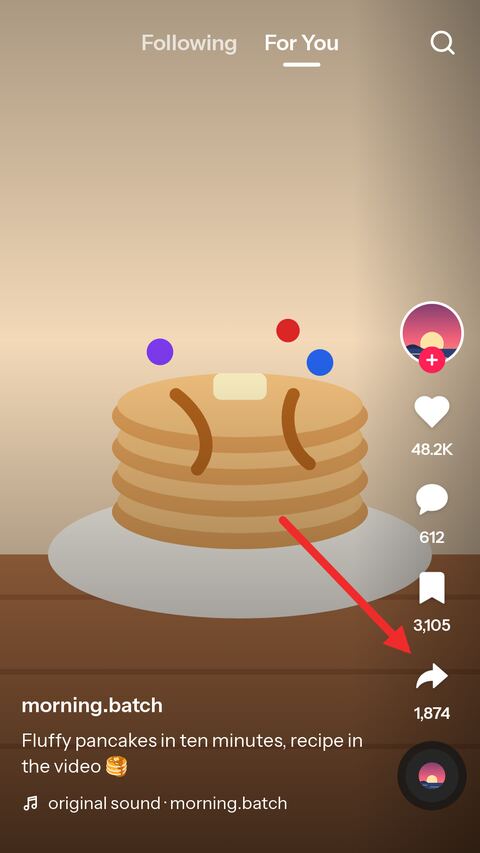
Find the video you want as text and tap the share arrow down the right-hand side.
-
Copy the link
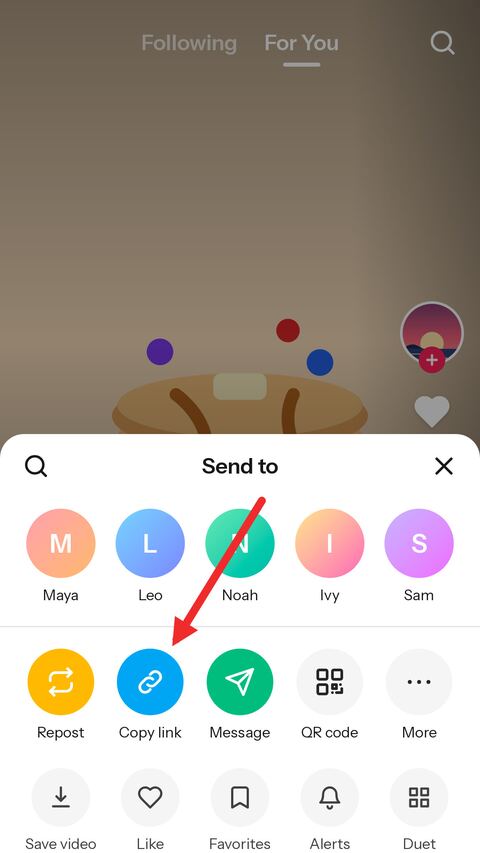
Choose "Copy link" in the sheet that opens. TikTok puts the address on the clipboard.
-
Paste it here
Paste the link into the field above. The transcript appears below it — copy the text or download it as TXT, SRT or VTT.
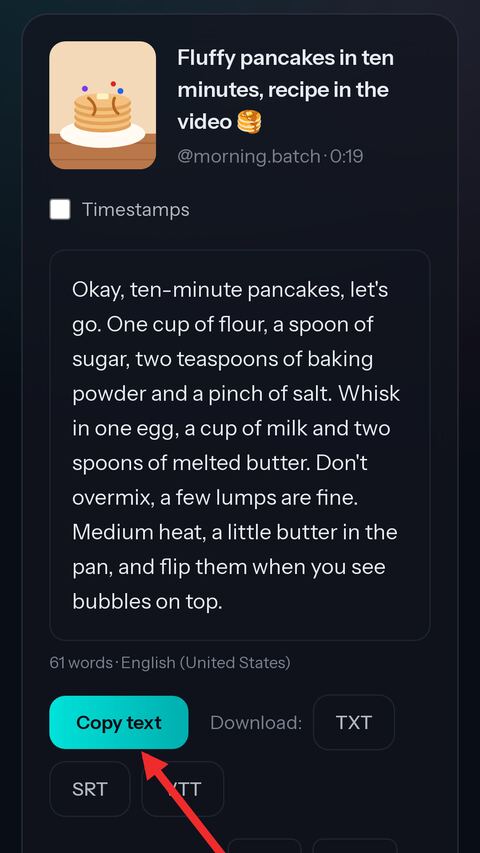


TikTok video to text, ready to copy
The whole transcript
Every word of the captions TikTok made for the video, joined into readable paragraphs instead of one short phrase per line.
With or without timestamps
Switch timestamps on to see when each line is said — handy for quoting, cutting or checking a moment.
One-click copy
Copy the text straight into a document, a note or a chat. No selecting, no scrolling.
TXT, SRT and VTT
Plain text for reading, SRT for video editors, WebVTT for web players — all three built from the same captions.
Other languages
When TikTok has the captions in more than one language, pick any of them from the list.
Free, no login
No account, no sign-up and no app. It works in the browser on a phone or a computer.
About TikTok transcripts
Where the transcript comes from
TikTok runs speech recognition on a great many of the videos posted to it and keeps the result as a caption track — the same captions the app shows when captions are switched on. A creator can review that text before posting and correct what the machine misheard, so for many videos the words have already been checked by the person who said them.
This page reads that track and nothing else. It does not listen to the video and guess at the words itself; what you see is the text TikTok holds for the post, split back into what was said and when. That is also why it is instant: there is no recognition to wait for.
Copy the text or download TXT, SRT and VTT
The transcript is shown as running text, broken into paragraphs where the speaker paused, because that is how text is easiest to read and paste. Switch on timestamps and every line gets the moment it is spoken, which is the version to keep when you need to find a quote again.
The three downloads are made from the same captions. TXT is the plain text, with or without timestamps, the way the card shows it. SRT is the subtitle format nearly every video editor imports — Premiere Pro, DaVinci Resolve, CapCut. WebVTT, or VTT, is the format web players and YouTube read. Both subtitle files keep the original timing, so they line up with the video they came from.
Why some TikTok videos have no transcript
A transcript exists only where TikTok made captions, and it does not make them for everything. A clip that is only music has none, nor does a video with no speech in it, and nor does one in a language TikTok does not transcribe. Older posts, from before TikTok captioned videos automatically, often have none either, and a creator can turn captions off for a post entirely.
In each of those cases the card says so rather than showing an empty box. If the sound is what you are after, the MP3 page will still give you that.
How accurate a TikTok transcript is
It is as accurate as TikTok's captions, which on clear speech is very good and on anything else is not. Names, brands, slang and words drowned out by music are where machine captions slip, and lyrics sung over a track are often left out or mangled.
Nothing here rewrites the text, so whatever the captions say is what you get — including a creator's own corrections when they made some. For a quote that matters, play the moment back and check it; the timestamps are there to make that quick.
What people use TikTok transcripts for
Recipes and tutorials are the classic case: a list of ingredients or steps that went by too fast to write down is much easier to follow as text. Others keep the script of a video to study how it was put together, turn a talking video into a post or an article, quote a creator accurately, translate what was said, or simply read a video in a place where the sound cannot be on.
Whatever you do with the text, remember that it is the creator's words. Quote it with credit, and ask before republishing it as your own.
Captions in other languages
For some videos TikTok keeps the captions in more than one language — the one that was spoken, and translations made for viewers elsewhere. When a post has more than one, a language list appears above the transcript and each choice loads that version. The spoken language is the one shown first.
Translated captions are machine translations of machine captions, so read them for the sense rather than for the exact wording.
Frequently asked questions
Is the TikTok transcript generator free?
Yes. There is no account, no limit tied to one and nothing to pay. A short verification check appears from time to time to keep automated abuse away.
Why does my video have no transcript?
Because TikTok made no captions for it. That is usual for music-only clips, videos without speech, older posts and languages TikTok does not transcribe. A creator can also switch captions off for a post.
How accurate is the transcript?
It is exactly the text of TikTok's captions. On clear speech that is very accurate; names, slang, song lyrics and words under loud music are where it slips.
Can I download the transcript as subtitles?
Yes. SRT and VTT both keep the original timing, so they line up with the video. SRT goes into most video editors; VTT is for web players and YouTube.
Can I get the transcript in another language?
When TikTok has the captions in more than one language, a list appears above the text and you can switch between them. The page does not translate anything itself.
Does it work for private videos?
No. Only public posts can be read. Private, friends-only, deleted and region locked posts return an error.
Do I need to log in or install anything?
No. Paste the link in any browser, on a phone or a computer, and the transcript appears.
Do you keep the transcripts?
A transcript is kept for a few hours so opening it again is instant, then deleted automatically. Nothing is tied to you.
More free TikTok tools
-
Video Downloader
Paste a TikTok link and get a clean MP4 online — no watermark, in the best HD quality TikTok offers. Free on phone, tablet and desktop.
-
Slideshow
Paste a link to a TikTok photo post to save the slides online for free. Take one picture, all of them in a ZIP, or the whole slideshow as a video with sound in HD MP4.
-
TikTok to MP3
Paste a TikTok link to pull the sound out of the video online. Save the original audio untouched in M4A/AAC, or take a high quality MP3 — free, no app.
-
Thumbnail Downloader
Save the cover of any TikTok video as a full-size JPG, or as the animated preview.
-
Profile Picture Viewer
See any TikTok profile picture in full size and download it as a JPG, by username or profile link.
-
TikTok to GIF
Pick a moment of a TikTok video and turn it into an animated GIF, without the watermark.
-
Profile Downloader
Enter a username to see an account's videos and download the ones you want, without the watermark.