TikTok Profile Picture Viewer and Downloader
Type a TikTok username or paste a profile link to see the profile picture in full size — not the small circle the app shows — and download it as a JPG. Free, and no login.
How to download a TikTok profile picture
-
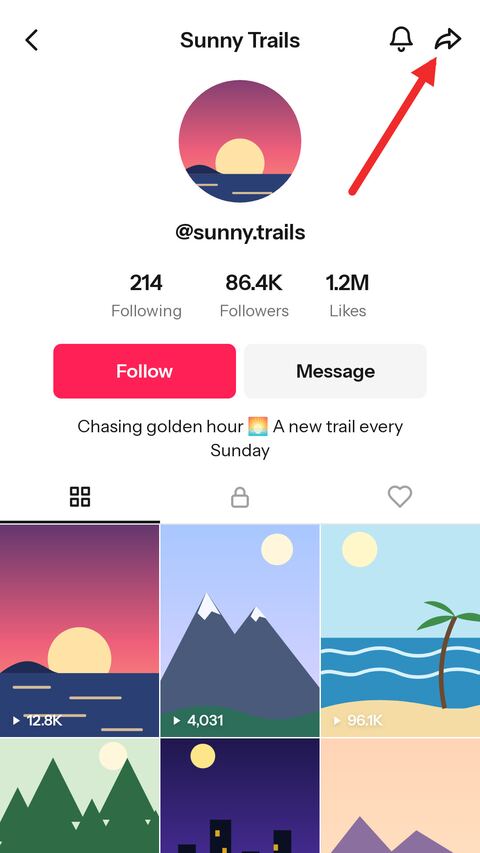
Open the profile in TikTok
Go to the account and tap the share arrow at the top of its profile.
-
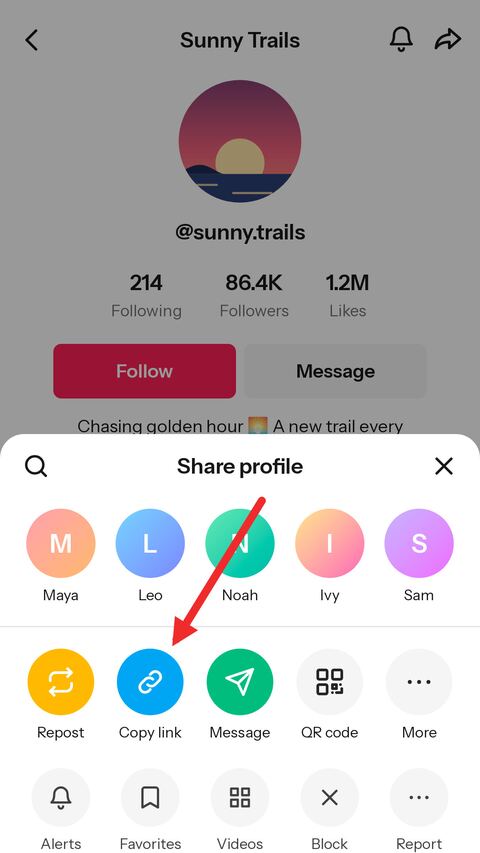
Copy the link
Choose "Copy link". A link to any of the account's videos works just as well.
-
Paste it and save the picture
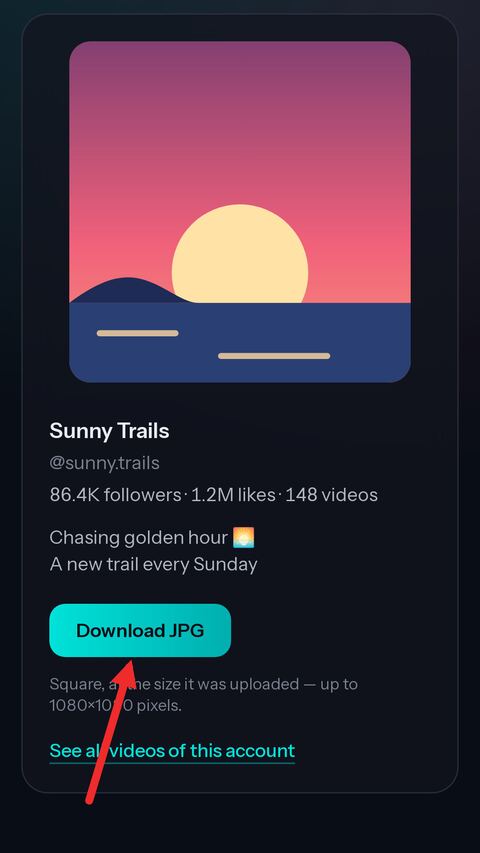
Paste the link above — or type the @username — and press View. Download the picture as a JPG.


See a TikTok profile picture in full size
The whole picture
The square image behind the little circle, at the largest size TikTok keeps — up to 1080×1080.
By username or link
Type @username, paste a profile link, or paste a link to any of the account's videos.
Saved as JPG
One click saves it as a JPG that opens in any gallery or editor.
Private accounts too
A private account hides its videos, not its picture, so the picture can be viewed all the same.
The account at a glance
Name, verification, bio, followers, likes and the number of videos, next to the picture.
No login
No TikTok account and no sign-up here either. It works in any browser.
About TikTok profile pictures
Why the picture in the app is so small
TikTok shows a profile picture as a small circle — on the profile, beside every video and in every comment — and the app gives no way to open it any larger. The picture behind that circle is a square, usually far bigger than the circle it is squeezed into.
This page opens that square. The corners the circle hides are there, and so is the detail lost when it is shrunk to the size of a thumbnail.
How large a TikTok profile picture really is
TikTok keeps the picture at the size it was uploaded, up to 1080 by 1080 pixels. An account that uploaded a large photo has a large picture; one that uploaded a small image, or set its picture years ago, has a smaller one — 224 pixels square is not unusual. On real accounts we have seen everything from that up to the full 1080.
What you download is the largest copy TikTok has, never enlarged. If the picture looks soft at full size, that is the picture as it was uploaded.
Download a PFP by username or profile link
There are three ways to name the account. The username is the handle after the @ on the profile — letters, digits, dots and underscores; type it with or without the @. A profile link is what TikTok copies when you share a profile. And a link to any video the account posted works too, since it names its author.
Short share links from the app, the vm.tiktok.com kind, can point at a video or a profile; for this page, a username or a full link is the surer choice.
Why old profile pictures cannot be recovered
TikTok serves one picture per account: the current one. When it is changed, the old one is no longer offered, and there is no history of earlier pictures to look up — not here, and not on any site that claims otherwise.
If you want to keep a picture someone may change, save it now.
Private accounts and profile pictures
Making an account private hides its videos, its likes and its followers list from people who are not approved. It does not hide the name or the profile picture, which TikTok shows to everyone — so a private account's picture opens here like any other.
The profile is opened the way a logged-out visitor sees it, and nothing about it is tied to a TikTok account. Use what you save with the person in it in mind: a profile picture is someone's photo, not a stock image.
Frequently asked questions
Is the TikTok profile picture viewer free?
Yes. There is no account, no limit tied to one and nothing to pay. A short verification check appears from time to time to keep automated abuse away.
What size is a TikTok profile picture?
The size it was uploaded at, up to 1080×1080 pixels. Many are smaller; the picture is never enlarged here.
Can I see the profile picture of a private account?
Yes. A private account hides its videos, not its name or picture.
Can I see someone's old profile pictures?
No. TikTok only serves the current picture and keeps no public history of earlier ones.
Do I need the exact username?
Yes, the handle after the @, spelled exactly. Capital letters do not matter. If you are not sure, paste a link to one of the account's videos instead.
Will the account owner know I looked?
The profile is opened the way a logged-out visitor sees it, and nothing about the visit is tied to a TikTok account.
Does it work on iPhone?
Yes. Safari saves the JPG to the Files app; open it there and use Share, then Save Image, to put it in Photos.
What if an account does not exist?
The page says so. A misspelt name, a deleted account and a banned one all look the same from outside.
More free TikTok tools
-
Video Downloader
Paste a TikTok link and get a clean MP4 online — no watermark, in the best HD quality TikTok offers. Free on phone, tablet and desktop.
-
Slideshow
Paste a link to a TikTok photo post to save the slides online for free. Take one picture, all of them in a ZIP, or the whole slideshow as a video with sound in HD MP4.
-
TikTok to MP3
Paste a TikTok link to pull the sound out of the video online. Save the original audio untouched in M4A/AAC, or take a high quality MP3 — free, no app.
-
Transcript Generator
Turn a TikTok video into text you can copy, or download it as TXT, SRT or VTT subtitles.
-
Thumbnail Downloader
Save the cover of any TikTok video as a full-size JPG, or as the animated preview.
-
TikTok to GIF
Pick a moment of a TikTok video and turn it into an animated GIF, without the watermark.
-
Profile Downloader
Enter a username to see an account's videos and download the ones you want, without the watermark.