TikTok Profile Downloader: Save Videos by Username
Type a TikTok username or paste a profile link to see the account's public videos, newest first, and download any of them without the watermark. Free, and no login.
How to download TikTok videos by username
-
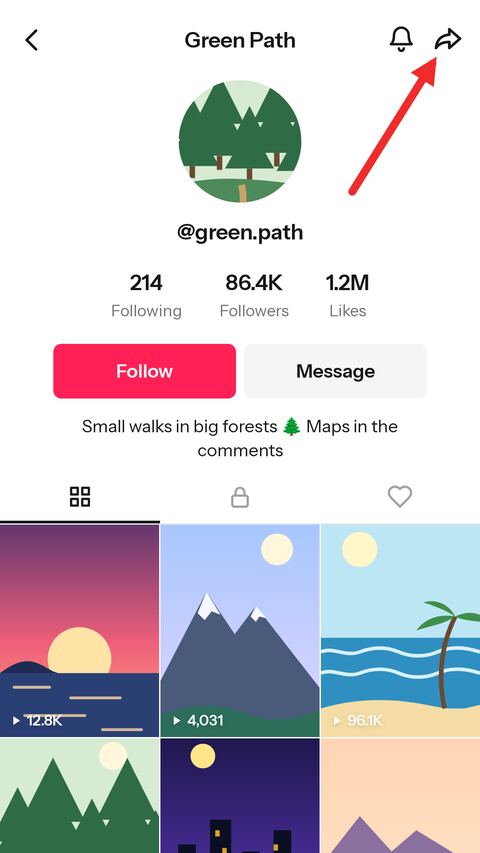
Open the profile in TikTok
Go to the account and tap the share arrow at the top of its profile.
-
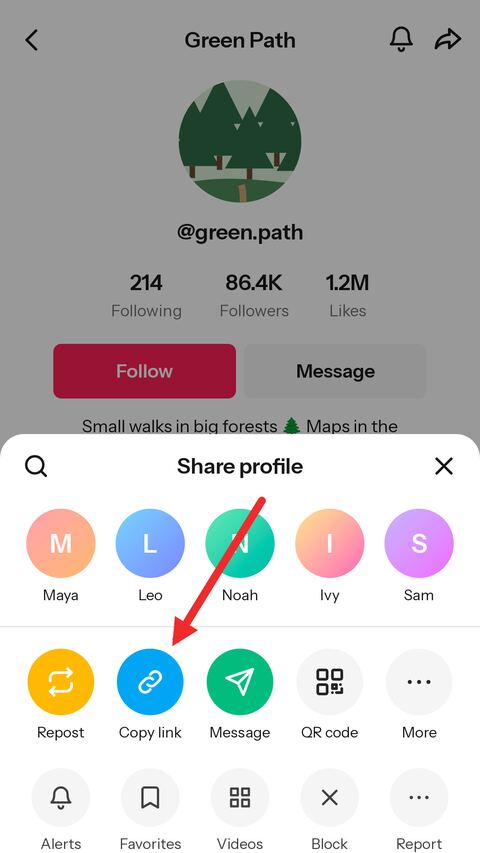
Copy the link
Choose "Copy link" — or skip both steps and just type the @username in the field above.
-
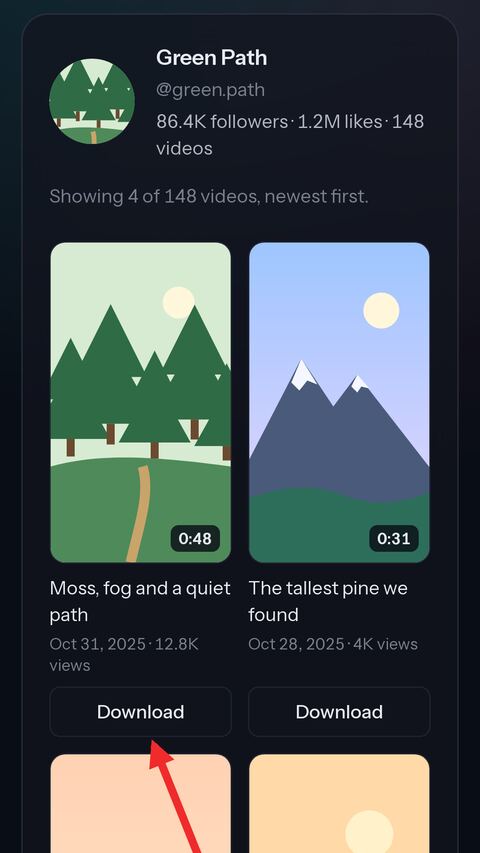
Paste it and pick videos
Paste the link and press Show videos. Press Download under any video: no watermark, HD, and the rest.


Every public video of an account on one page
By username
Type @username or paste a profile link — no need to find each video and copy its link one by one.
Newest first
Covers, dates, views and lengths, 30 at a time, with more a click away — up to the newest 300.
No watermark
Each video downloads as the clean MP4, in HD when TikTok keeps an HD copy.
MP3 and more
From any video in the list, go on to its sound as MP3, its transcript, its cover or a GIF.
Photo posts too
Slideshows in the list open with every slide to save, or the whole post as a video.
No login
No TikTok account and no sign-up. It works in the browser on a phone or a computer.
About downloading a TikTok profile
Every public video of an account on one page
Saving several videos from one creator usually means opening each, copying its link, pasting it and going back for the next. Here the account comes first: name it, and its public videos are laid out as a grid of covers, newest first, with the date, the number of views and the length of each.
The list comes thirty at a time, and Show more videos goes further back. It reaches the newest 300 videos of an account, which for most accounts is all of them; for a longer back catalogue, an older video can still be downloaded by pasting its own link.
Download each video without the watermark
Pressing Download under a video opens the same card the video downloader gives a pasted link: the clean MP4 without the moving TikTok logo, the HD copy when TikTok keeps one, and a preview to check it is the right one. From there the same video can go on to the MP3 page, the transcript, the cover or the GIF maker.
A photo post in the list opens as slides, each one ready to save, along with the whole post as a video with its sound.
Why there is no "download all" button
Every video is a separate trip to TikTok, and a button that fired off three hundred of them at once would be the fastest way to get this service — and the address it uses — refused by TikTok for everyone. So each video is downloaded on its own, when you choose it, the way it is for any pasted link.
In practice that costs little: the list is already there, and saving the five or ten videos you actually wanted takes a minute. A tool that promises a whole account in one click is either asking for your TikTok login or will not keep working for long.
Profiles that cannot be opened
A private account cannot be listed: its videos are visible only to the followers it has approved, and what reaches our side is what a logged-out visitor sees. Its profile picture is public, though, and the profile picture viewer will show it.
An account that has posted nothing, one that has been banned or deleted, and a username with a typo in it all come back with a message saying so. Videos the account has only liked or reposted are not part of its profile, and neither are its stories.
Downloading responsibly
The videos belong to the people who made them. Saving them to watch offline, to keep a copy of your own posts or to quote one with credit is one thing; re-uploading someone else's work as your own is another, and it is the kind of use TikTok and creators push back on.
Frequently asked questions
Is the TikTok profile downloader free?
Yes. There is no account, no limit tied to one and nothing to pay. A short verification check appears from time to time to keep automated abuse away.
Can I download all videos of an account at once?
No. The account's videos are listed together, and each one is downloaded on its own when you choose it. There is no one-click download of a whole account, for the reasons explained above.
How many videos does the list show?
Thirty at a time, newest first, up to the newest 300 of an account. An older video can still be downloaded by pasting its own link.
Are the videos without a watermark?
Yes. Each one downloads as the clean MP4, in HD when TikTok keeps an HD copy.
Can I get a video as MP3?
Yes. Open the video from the list and choose MP3 under it, which takes you to the MP3 page with that video ready.
Does it work with private accounts?
No. A private account's videos are only visible to its approved followers. Its profile picture is public and can be viewed with the profile picture viewer.
Do I need the exact username?
Yes, the handle after the @, spelled exactly; capital letters do not matter. A link to one of the account's videos works just as well.
Are liked videos or stories included?
No. The list is the account's own public posts, videos and photo posts alike.
More free TikTok tools
-
Video Downloader
Paste a TikTok link and get a clean MP4 online — no watermark, in the best HD quality TikTok offers. Free on phone, tablet and desktop.
-
Slideshow
Paste a link to a TikTok photo post to save the slides online for free. Take one picture, all of them in a ZIP, or the whole slideshow as a video with sound in HD MP4.
-
TikTok to MP3
Paste a TikTok link to pull the sound out of the video online. Save the original audio untouched in M4A/AAC, or take a high quality MP3 — free, no app.
-
Transcript Generator
Turn a TikTok video into text you can copy, or download it as TXT, SRT or VTT subtitles.
-
Thumbnail Downloader
Save the cover of any TikTok video as a full-size JPG, or as the animated preview.
-
Profile Picture Viewer
See any TikTok profile picture in full size and download it as a JPG, by username or profile link.
-
TikTok to GIF
Pick a moment of a TikTok video and turn it into an animated GIF, without the watermark.