TikTok Thumbnail Downloader: Save Any TikTok Video Cover
Paste a TikTok link to download the video cover as a full-size JPG — the picture people see before they press play. Free, without a watermark, on any device.
How to download a TikTok thumbnail in 3 steps
-
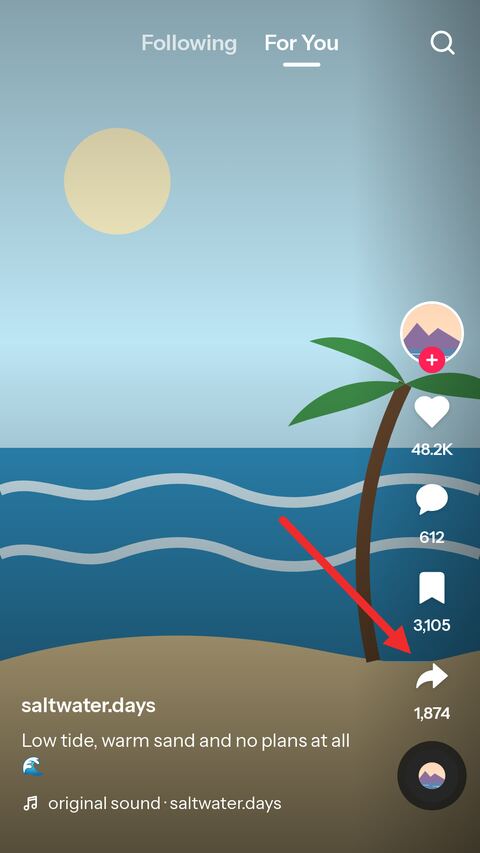
Open the video in TikTok
Find the video whose cover you want and tap the share arrow down the right-hand side.
-
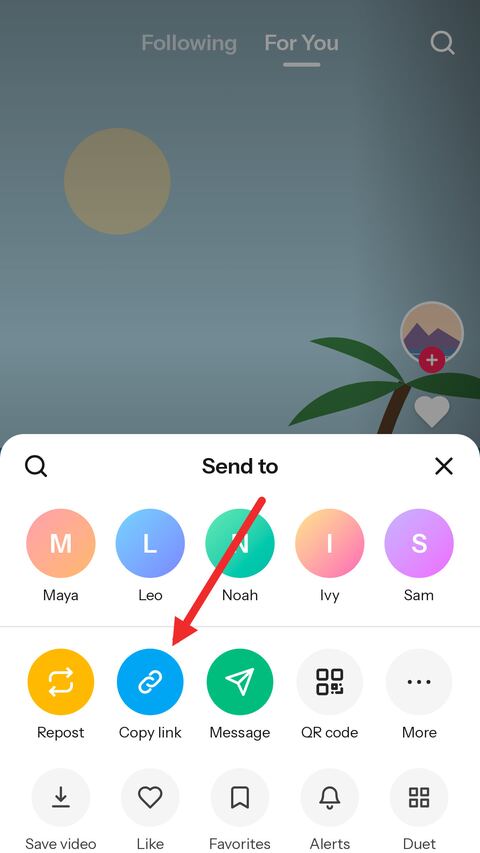
Copy the link
Choose "Copy link" in the sheet that opens. TikTok puts the address on the clipboard.
-
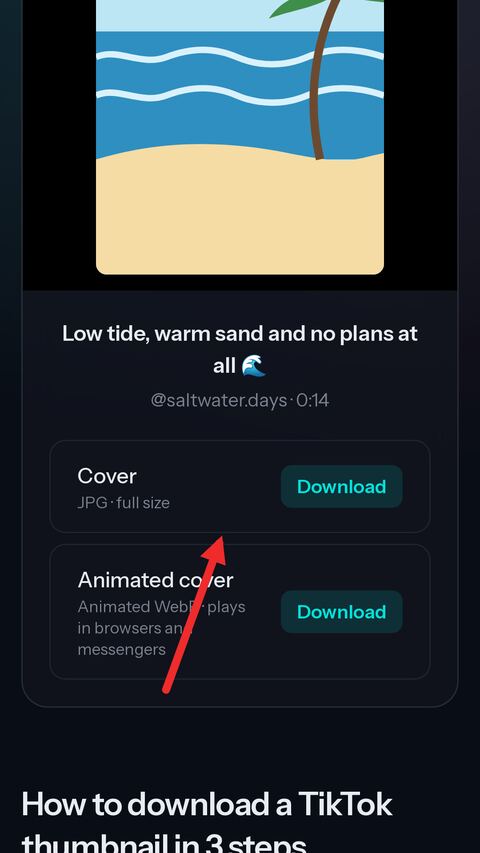
Paste it here
Paste the link into the field above. The cover appears at full size — save it as a JPG, or save the animated one.


What the TikTok cover downloader gives you
The full-size cover
The thumbnail at the size TikTok stores it, which is the size of the video itself — up to 1080×1920.
A real JPG
Saved as a JPEG that opens in any gallery or editor. If TikTok sends another format, it is converted once on the way.
The animated cover too
When TikTok made a moving preview for the post, you can save that short loop as an animated WebP as well.
No watermark
The cover is stored apart from the video, so the TikTok logo and username overlay are not on it.
Any TikTok link
Short share links, full desktop addresses and photo posts all work — paste whatever the app copied.
No app, no account
It runs in the browser on iPhone, Android, Windows, macOS and Linux. Nothing to install, nothing to sign up for.
TikTok thumbnail size, ratio and resolution
Which image you get: the cover the creator chose
Every TikTok video has a cover: the still picture that stands for it on a profile grid, in search results and in the second before playback starts. When a video is posted, the creator picks it — usually a frame from the video, sometimes with a line of text written over it in TikTok's cover editor. A creator who never chooses gets a frame TikTok picked for them.
That picture is what this page saves. It is the cover exactly as TikTok keeps it, not a screenshot of the player and not a frame grabbed from the video afterwards, so any text the creator added is part of it, and nothing of TikTok's interface is.
Size and ratio of a TikTok cover
TikTok keeps the cover at the size of the video it belongs to. A video uploaded in full HD has a 1080×1920 cover; a video that only ever existed at a lower resolution has a smaller one — 576×1024 is common for older posts and for clips recorded or uploaded at a lower quality. The ratio is the video's too, which for almost everything on TikTok is 9:16, upright.
TikTok also stores a second, smaller copy at 540×960, and that is the one a post's data names first — so a tool that simply takes the first picture it finds hands you the small one. This page takes the full-size cover instead, and falls back to the smaller copy only for a post that has no other.
Nothing is upscaled. If the video was 576 pixels wide, so is its cover, and stretching it to 1080 would make a bigger file that looks the same at best.
Still cover and animated cover
For many videos TikTok makes a second cover as well: a short, silent loop that plays in place of the still one on some screens. When a post has one, the card above offers it next to the JPG.
The animated cover is saved as the animated WebP TikTok made, because that is the format that keeps it moving. Browsers, messengers and most modern galleries play it; an older gallery app may show only its first frame. If you need a still picture for a thumbnail or a slide, the JPG is the one to take.
Covers of photo posts and slideshows
A photo post has a cover too, and it works the same way here: paste the link and the cover is offered as a JPG. For most photo posts the cover is simply the first picture of the set.
If what you are after is the pictures themselves rather than the cover, the slideshow page gives you every slide at full size, all of them in one ZIP, or the whole post as a video with its sound.
What cannot be downloaded
Only public posts. The cover of a video from a private account, one shared with friends only, a deleted post or one restricted to a region or an age group cannot be fetched, because what reaches our side is what a logged-out visitor would see — and none of those are visible to one.
The cover link, like every TikTok media address, is signed and stops working after a while. If a saved link no longer opens, paste the original TikTok link again for a fresh one.
Frequently asked questions
Is the TikTok thumbnail downloader free?
Yes. There is no account, no limit tied to one and nothing to pay. A short verification check appears from time to time to keep automated abuse away.
What resolution is a downloaded TikTok cover?
The resolution of the video it belongs to: 1080×1920 for a full HD video, smaller for a video that was never stored in full HD. The ratio is almost always 9:16.
Does the cover have a TikTok watermark?
No. The watermark is drawn onto the copy of the video the app saves. The cover is stored separately and does not carry it. Text the creator wrote onto the cover is part of the picture and stays.
What is the animated cover?
A short looping preview TikTok makes for many videos. It is saved as an animated WebP. It only appears when TikTok made one for that post.
Can I get the thumbnail of a private video?
No. Only public posts can be fetched. Private, friends-only, deleted and region locked posts return an error.
Can I choose a different frame as the thumbnail?
This page saves the cover TikTok stores for the post. To keep a different moment, download the video and take the frame you want from it.
Does it work on iPhone?
Yes. Safari saves the JPG to the Files app; open it there and use Share, then Save Image, to put it in Photos.
Do you keep the covers I download?
No. A cover is kept only long enough to be downloaded and is deleted automatically, usually within an hour or two.
More free TikTok tools
-
Video Downloader
Paste a TikTok link and get a clean MP4 online — no watermark, in the best HD quality TikTok offers. Free on phone, tablet and desktop.
-
Slideshow
Paste a link to a TikTok photo post to save the slides online for free. Take one picture, all of them in a ZIP, or the whole slideshow as a video with sound in HD MP4.
-
TikTok to MP3
Paste a TikTok link to pull the sound out of the video online. Save the original audio untouched in M4A/AAC, or take a high quality MP3 — free, no app.
-
Transcript Generator
Turn a TikTok video into text you can copy, or download it as TXT, SRT or VTT subtitles.
-
Profile Picture Viewer
See any TikTok profile picture in full size and download it as a JPG, by username or profile link.
-
TikTok to GIF
Pick a moment of a TikTok video and turn it into an animated GIF, without the watermark.
-
Profile Downloader
Enter a username to see an account's videos and download the ones you want, without the watermark.