TikTok to MP3 Online for Free — Original Audio Downloader
Paste a TikTok link to pull the sound out of the video online. Save the original audio untouched in M4A/AAC, or take a high quality MP3 — free, no app.
How to convert TikTok to MP3 in 3 steps
-
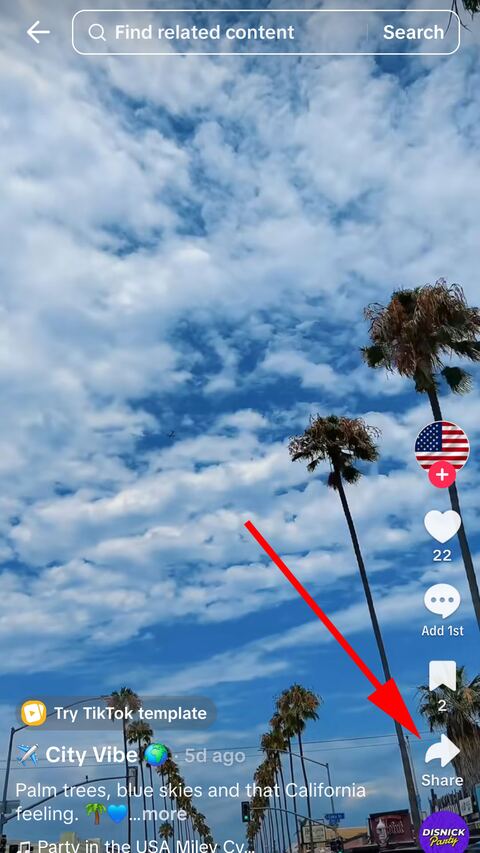
Open the video in TikTok
Find the video you want and tap the share arrow down the right-hand side.
-
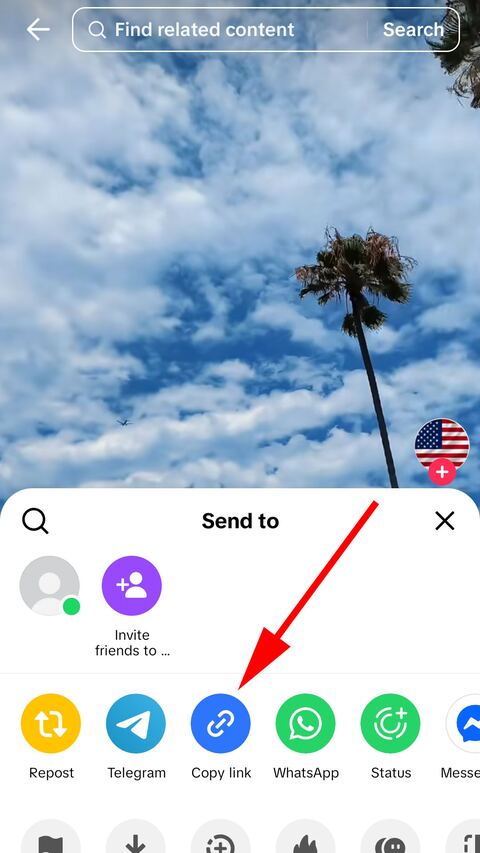
Copy the link
Choose "Copy link" in the sheet that opens. TikTok puts the address on the clipboard.
-
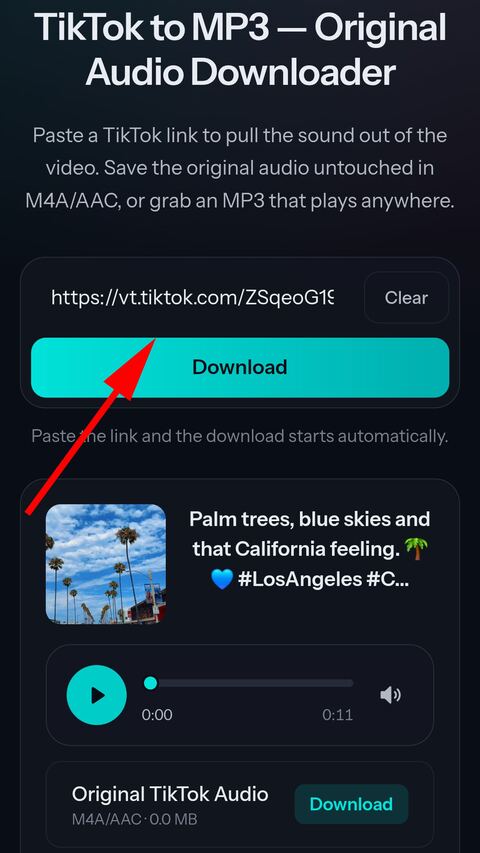
Paste it here
Paste the link into the field above. We pull the sound out — save it as the original audio or as an MP3.


What you get
The original, untouched
The AAC track lifted out of the video as it is, saved as M4A without a second encode.
MP3 when you need it
A high quality MP3, around 190 kbps on average, for anything that will not open an M4A.
Listen first
The track loads into a player on the page, so you can check it before saving anything.
Both formats at once
One paste produces both files. No going back to choose differently.
No app, no account
Everything runs in the browser. Nothing to install and nothing to sign up for.
Deleted automatically
Converted files are cached for a few hours so a repeat download is instant, then removed.
About TikTok audio
The original audio and the MP3 are not the same file
A TikTok video carries its sound as an AAC track inside the video container. Taking that track out does not require converting anything: the audio is copied out whole and put in an M4A file, which is a container built for exactly this. What you end up with is bit for bit what TikTok was playing.
The MP3 is that same track run through an MP3 encoder afterwards. It is a genuine conversion, and it exists because MP3 opens on things M4A does not.
Why converting a second time costs something
Both AAC and MP3 are lossy: they save space by discarding detail a listener is unlikely to notice. The important part is that the discarding already happened once, when TikTok encoded the video.
Encoding that result again as MP3 makes a second set of those decisions, this time about audio that has already had detail removed. The damage is small at a high bitrate and it is not zero, and it is the entire reason the untouched M4A is offered first rather than being quietly converted for everyone.
Our MP3 is written in high quality, at a variable bitrate of roughly 190 kbps on average, which is generous enough that most people will not hear the difference. It still cannot be better than what TikTok stored — nothing downloaded from anywhere can be.
Which file to pick
Take the M4A if you care about quality, plan to edit the sound, or are putting it into a video project. It is the better file and it is usually the smaller one.
Take the MP3 if the thing playing it is old or fussy: a car stereo over USB, an MP3 player, a sound system that reads a memory stick, or software that refuses anything but MP3. Every current phone and computer plays M4A without help.
How much of the song you get
The audio of that particular video, and nothing more. If a creator used fifteen seconds of a track, the file is fifteen seconds long. There is no full version hidden behind it — the video never contained one.
A video with talking over music gives you the talking as well, because it is a single mixed track. TikTok does not store the voice and the music separately, so they cannot be handed to you separately.
Why preparing the audio takes a few seconds
Video downloads stream straight through to you without ever landing on our disk. Audio cannot work that way: the sound is interleaved with the picture inside the file, so the video has to be fetched to our side first and the track separated out of it.
That is normally a few seconds. A longer video takes a little more, because there is more of it to read. The wait is the transfer, not the extraction.
Using the track afterwards
Downloading audio does not give you any right to it. Most music on TikTok is licensed to a rights holder, and the licence covers its use inside TikTok — not in a video you publish elsewhere, and not in anything commercial.
For personal listening this is rarely a problem. For anything you plan to post or sell, the track needs to be cleared the same way it would be if you had found it anywhere else.
Frequently asked questions
What is the difference between the original audio and the MP3?
The original audio is the exact AAC track lifted out of the video without re-encoding, saved as an M4A file — nothing is lost. The MP3 is that same track converted to MP3 so it plays on older devices and in software that will not open M4A.
Which one should I pick?
Choose the original M4A if you care about quality or plan to edit the sound. Choose MP3 if you need maximum compatibility, for example for a car stereo or an older player.
What quality is the MP3?
It is high quality: a variable bitrate of roughly 190 kbps on average, converted online as soon as you paste the link. Since it comes from the video track, it can never be better than what TikTok stored — but it will not be noticeably worse.
Can I listen before downloading?
Yes. Once the audio is ready it loads into the player on this page, so you can check it is the right track before saving anything.
Why does preparing the audio take a few seconds?
The video has to be fetched to our server first, then the sound is separated from it. That is normally a few seconds; longer videos take a little more.
Is the audio the full song?
It is the audio of that specific video, so it is as long as the video. If the creator used a 15 second clip of a track, you get those 15 seconds.
Can I use the audio in my own video?
Only if you have the right to. Most music on TikTok is licensed to the rights holder, and downloading it here does not transfer any rights to you.
Do you store the audio files?
Only briefly. Converted files are cached for a few hours so a repeated download is instant, then deleted automatically.
TikTok Video Online Downloader Without Watermark in HD MP4
Paste a TikTok link and get a clean MP4 online — no watermark, in the best HD quality TikTok offers. Free on phone, tablet and desktop.
Video Downloader