TikTok Video Online Downloader Without Watermark in HD MP4
Paste a TikTok link and get a clean MP4 online — no watermark, in the best HD quality TikTok offers. Free on phone, tablet and desktop.
How to download a TikTok video in 3 steps
-
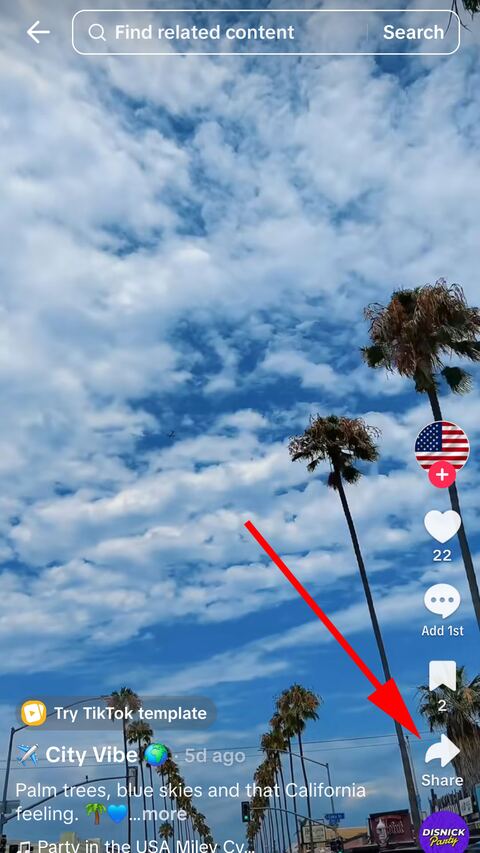
Open the video in TikTok
Find the video you want and tap the share arrow down the right-hand side.
-
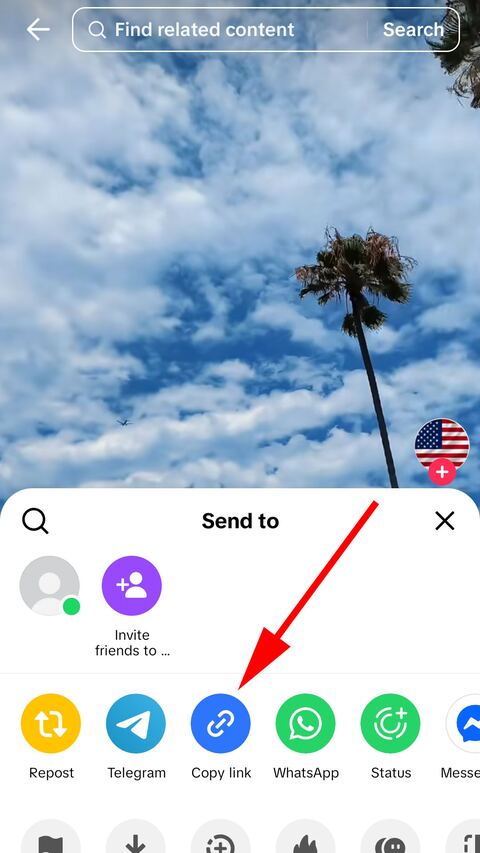
Copy the link
Choose "Copy link" in the sheet that opens. TikTok puts the address on the clipboard.
-
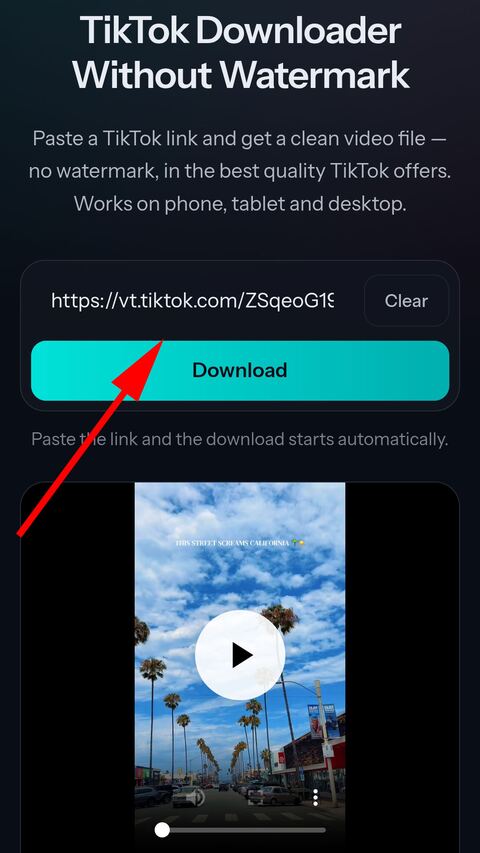
Paste it here
Paste the link into the field above. The search starts on its own — then pick the quality and save the file.


What you get
No watermark
The clean source file straight from TikTok, without the moving username overlay.
HD when available
If TikTok stores a higher resolution copy, we offer it alongside the standard one.
Never re-encoded
The MP4 is passed through byte for byte. Nothing is compressed a second time on the way to you.
No app, no account
Everything runs in the browser. Nothing to install and nothing to sign up for.
Works everywhere
iPhone, Android, Windows, macOS and Linux — any modern browser will do.
Nothing kept
Video streams straight through to you and is never written to our disk.
About downloading TikTok videos
What "without watermark" actually means
TikTok keeps more than one copy of a video. One of them carries the animated overlay — the username and the TikTok logo drifting from corner to corner — burned into the picture itself. That is the copy the Save button inside the app hands you, and once the overlay is part of the frames there is no way to lift it back out.
The other copy is the same encode without that overlay pass. It is not a cleaned-up version and it has not been processed to remove anything; it is simply the MP4 as it existed before the overlay was drawn on. When that copy is reachable, it is the one you get here, which is why the picture is identical in quality rather than slightly softer.
This also explains a thing people notice and mistrust: a watermark-free file is often a little smaller than the one saved from the app. Nothing was thrown away — the overlay is moving detail that costs bitrate to encode, so removing it from the source removes its cost too.
Why HD appears for some videos and not others
TikTok makes several renditions of an upload at different resolutions, and a 1080p one is not made for everything. Whether it exists depends on what the creator uploaded, what they recorded on, and decisions TikTok makes on its own side about which posts are worth storing at a higher bitrate.
When a higher resolution copy exists we list it as a separate option next to the standard one. When it does not, only the standard quality appears. We never upscale a file to fill in the gap: stretching 720p to 1080p produces a bigger file that looks the same at best, and the option would be a lie about what you are getting.
If a video was filmed on an older phone or uploaded over a weak connection, there may be nothing above 720p to offer no matter where you download it from.
Which kinds of link work
All of them. The short share links the app produces — the vm.tiktok.com and vt.tiktok.com ones — work, and so do full desktop addresses with a username and a numeric post id in them. Tracking parameters on the end change nothing and can be left in place.
A short link does not say what it points at until it is opened, so every page here accepts every kind of TikTok link and works out for itself whether it found a video, a photo post or something with an unusual layout. Paste a slideshow link on this page and you get slides, not an error.
What cannot be downloaded
Anything that is not publicly visible. A post from a private account, one limited to friends, one that has been deleted, and one restricted to a region or an age group all fail, and they fail for the same reason: what reaches our side is exactly what a logged-out visitor would see, and none of that is visible to a logged-out visitor.
There is no setting or workaround for this, here or anywhere. A downloader that claims otherwise is either asking you for a TikTok login or is not telling the truth about what it does.
Saving the file on a phone
On Android the download behaves like any other browser download: it lands in the Downloads folder and appears in the gallery shortly afterwards, sometimes after the media scanner catches up.
On iPhone, Safari puts the file in Files rather than in Photos. Open the Downloads folder there, tap the video, and use Share to move it into your camera roll. This is iOS behaviour rather than something a website can change — any download of any video on an iPhone goes through the same step.
Why a download link stops working after a while
The addresses TikTok serves media from are signed and time-limited. That signature is part of how their delivery network works, and it expires whether or not anyone used the link.
If a download fails or a saved link stops responding, paste the original TikTok address again. The result is a fresh signed link and the download starts working immediately. Nothing is broken on your side and nothing needs clearing.
Frequently asked questions
Is FromTik.net free?
Yes. Every download is free and there is no limit tied to an account, because there are no accounts — everything happens online, in your browser. A short verification check appears from time to time to keep automated abuse away.
Do I need to install an app?
No. FromTik.net runs entirely in your browser on any device — iPhone, Android, Windows, macOS or Linux.
What does "without watermark" mean?
TikTok stores two copies of most videos: one with the moving username overlay burned into the picture, and a clean one without it. FromTik.net gives you the clean copy whenever TikTok exposes it.
Why is there sometimes an HD option and sometimes not?
It depends on what the creator uploaded and what TikTok chose to store. When a higher resolution copy exists we list it as a separate HD option; when it does not, only the standard quality is shown.
Can I download private videos?
No. Only posts that are publicly visible can be fetched. Private, deleted or region locked videos will return an error.
Do you keep the videos I download?
No. Video files stream straight through to you and are never written to disk. Audio files are generated on demand and deleted automatically within hours.
Why does the download sometimes fail?
TikTok links expire after a while. If a download stops working, paste the video link again to get a fresh one.
Can I download photo slideshows?
Yes. Paste a link to a photo post and every slide appears as a picture you can save one by one, all at once in a ZIP, or as a video built from the slides and the sound. It works from this page too, but the slideshow page explains it properly.
TikTok Slideshow Downloader for Free Without Watermark
Paste a link to a TikTok photo post to save the slides online for free. Take one picture, all of them in a ZIP, or the whole slideshow as a video with sound in HD MP4.
SlideshowTikTok to MP3 Online for Free — Original Audio Downloader
Paste a TikTok link to pull the sound out of the video online. Save the original audio untouched in M4A/AAC, or take a high quality MP3 — free, no app.
TikTok to MP3