TikTok Slideshow Downloader for Free Without Watermark
Paste a link to a TikTok photo post to save the slides online for free. Take one picture, all of them in a ZIP, or the whole slideshow as a video with sound in HD MP4.
How to download a TikTok slideshow in 3 steps
-
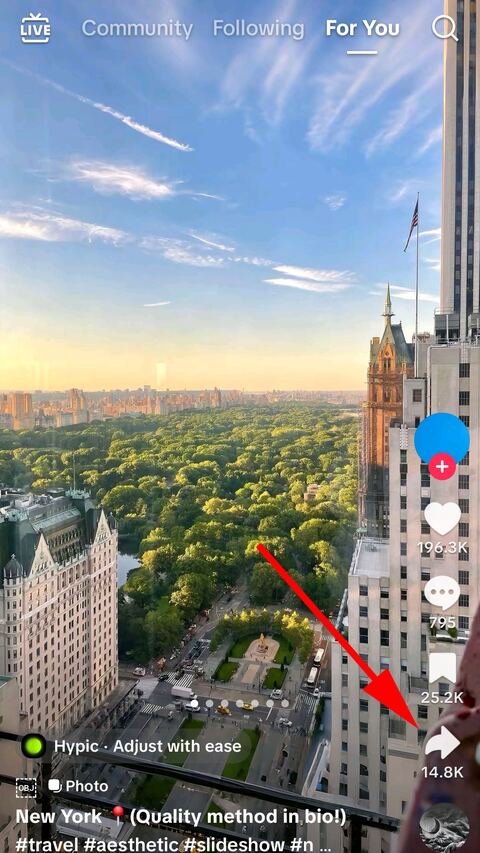
Open the photo post in TikTok
Find the photo post you want and tap the share arrow down the right-hand side.
-
Copy the link
Choose "Copy link" in the sheet that opens. TikTok puts the address on the clipboard.

-
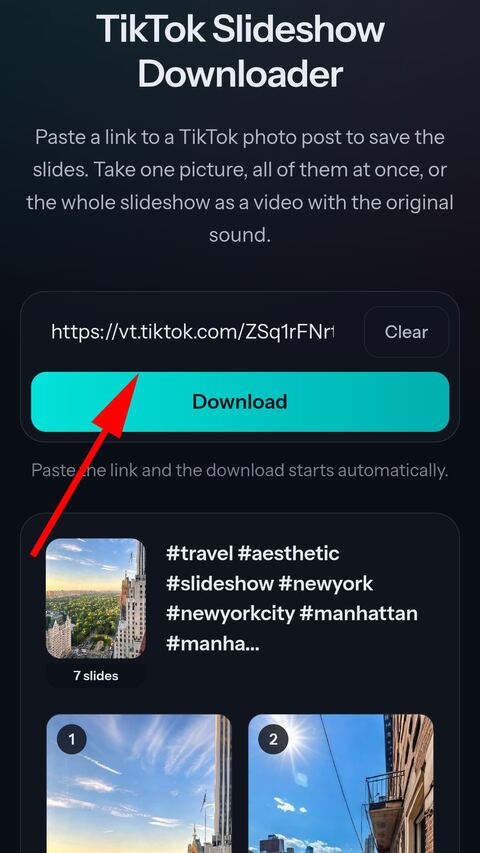
Paste it here
Paste the link into the field above. Every slide appears as a picture — save one, all of them in a ZIP, or the whole slideshow as a video with its sound.


What you get
Every slide at full size
Each picture exactly as TikTok stores it, at its original resolution and untouched.
All of them in one ZIP
One download for the whole post instead of tapping through slides one at a time.
Built into a video
The slides and the track assembled into an HD MP4 — a video with sound you can post anywhere, the way the app does it.
Nothing cropped
Pictures are fitted whole into the frame, so a caption or a screenshot never loses its edges.
The track as well
The sound of the post is offered on its own, alongside the pictures.
Cached briefly, then gone
Slides and archives live a few hours so a repeat download is instant, then delete themselves.
About TikTok photo posts
Why a photo post has no video file to download
A slideshow is not a video that happens to be made of pictures. TikTok stores it as what it is: a list of images and a separate audio track. The scrolling, the timing and the transitions you see are produced by the app on your own phone as you watch, and there is no finished video sitting on a server anywhere.
That is why saving a photo post from inside the app takes a moment while your phone works — it is building the video at that instant. It is also why a plain downloader that only knows how to fetch a video file returns nothing useful for these posts.
We do the same job on our side. Asking for the slideshow video starts a render: every picture is read once, laid into a frame, and the track is placed underneath. That single pass is the few seconds you wait. Saving the pictures themselves involves no render and is immediate.
Three ways to save the same post
One slide at a time, when you came for a particular picture. Tap any slide to open it full size and swipe through the rest before deciding.
All of them in a single ZIP, which is the sensible choice for a long post — a twenty slide recipe or a screenshot thread is twenty separate taps otherwise.
As a video, when the post needs to stay a post: something to re-share, send to someone who does not use TikTok, or keep with its music attached.
How the video is put together
Each slide is held for about three seconds, which is close to the pace the TikTok app uses, and the whole thing is rendered into a 1080×1920 portrait MP4 — the shape every platform expects for this kind of clip.
If the pictures outlast the track, the music repeats rather than falling silent partway through. A slideshow that ends in silence looks broken even when nothing went wrong, and a post is usually being saved in order to be watched again. Nothing is drawn on top of the pictures on the way through either, so the video comes out without a watermark — the same clean slides you would get one at a time.
Why some slides sit inside black bars
Slides in one post are often different shapes: a screenshot from a phone, a photo taken sideways, something saved from elsewhere. They cannot all fill a portrait frame at once.
Every picture is fitted whole into the frame rather than cropped to fill it. Cropping would look tidier and would also cut the top off a screenshot and the bottom off a caption, which is usually where the point of the slide is. The bars are the honest trade: everything you can see in the app is still visible in the file.
The sound of a photo post
TikTok stores the track of a photo post as either AAC or MP3, and which one it is decides what you can get. For an AAC track you get the untouched M4A plus an MP3 converted from it. For a track that is already an MP3, you get that one file, copied rather than converted — running it through a second MP3 encode would only add damage.
The track is offered on its own under the slides, so a post you only wanted the music from does not need to be downloaded as pictures first.
Photo links and video links
TikTok publishes photo posts at a /photo/ address while videos sit at /video/, but both work here, and so do the short share links that give away neither.
This page and the video page accept the same links and behave the same way — the difference between them is what they explain, not what they take. If you paste a photo post anywhere on this site, you get slides.
Frequently asked questions
What is a TikTok slideshow?
A photo post: several pictures that are swiped through while a track plays, rather than a video. TikTok publishes them at a /photo/ address instead of /video/, though both links work here.
Do the pictures keep their original quality?
Yes. Each slide is saved exactly as TikTok stores it, at full size and untouched — nothing is re-compressed on the way to you.
Why does the slideshow video take a few seconds?
TikTok does not store a video for a photo post; its app builds one on your phone when you save it. We build ours the same way online, on our server, which means one pass over every picture. Saving the slides themselves is instant.
How long is each slide shown in the video?
About three seconds, which is close to what the TikTok app does. If the pictures outlast the track, the music repeats so every slide is seen.
Why does the video have black bars?
Slides of one post are often different shapes. Each picture is fitted whole into a portrait frame instead of being cropped to fill it, because cropping would cut off the top of a screenshot or the bottom of a caption.
Can I get just the sound?
Yes, it appears under the slides on its own. TikTok stores the track of a photo post as either AAC or MP3: for an AAC one you get the untouched M4A and an MP3 converted from it, and for a track that is already an MP3 you get that single file, copied rather than converted.
Can I paste a normal video here?
Yes. Every page on FromTik.net accepts any TikTok link and works out what it is — which it has to, because a short share link says nothing about the post until it is opened.
Do you keep the slides?
Only briefly. Pictures and archives are cached for a few hours so a repeated download is instant, then deleted automatically.
TikTok Video Online Downloader Without Watermark in HD MP4
Paste a TikTok link and get a clean MP4 online — no watermark, in the best HD quality TikTok offers. Free on phone, tablet and desktop.
Video Downloader