TikTok to GIF Converter: Turn a TikTok Video into a GIF
Paste a TikTok link, pick the seconds you want and get an animated GIF of them — from the clean copy of the video, so without the watermark. Free, in the browser.
How to make a GIF from a TikTok video
-
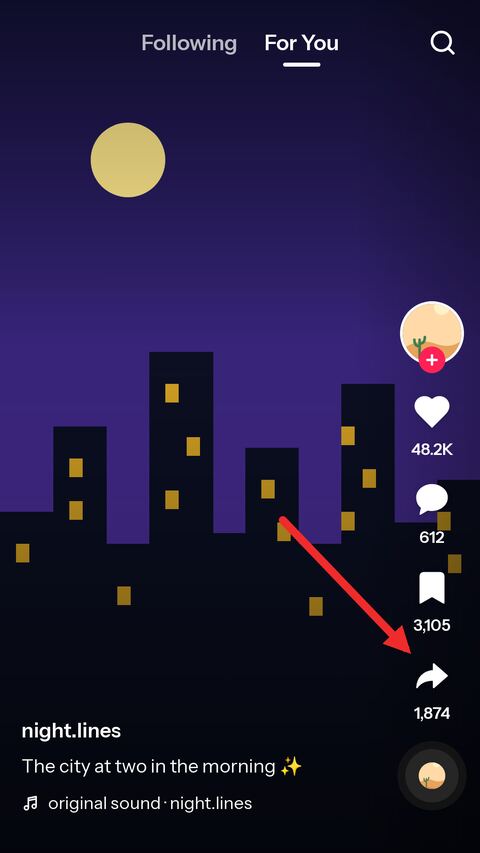
Open the video in TikTok
Find the video you want a moment of and tap the share arrow down the right-hand side.
-
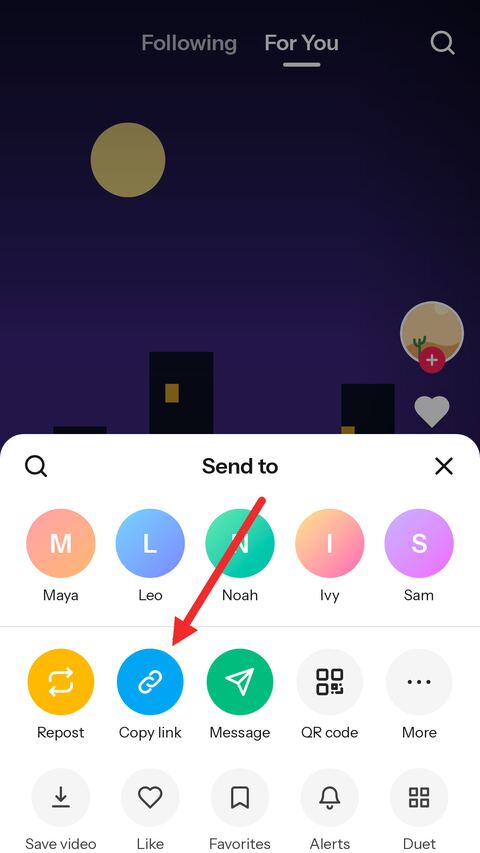
Copy the link
Choose "Copy link" in the sheet that opens. TikTok puts the address on the clipboard.
-
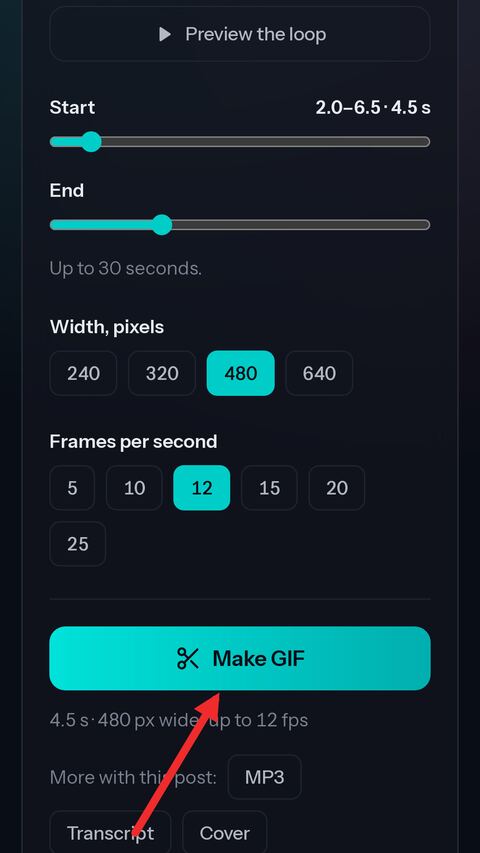
Paste it and make the GIF
Paste the link above, move the sliders to the moment you want, pick the size and press Make GIF.


Convert TikTok to GIF online — the part you choose
Straight from the link
No downloading the video first and uploading it somewhere else. Paste the TikTok link and the maker opens on it.
Any moment you want
Set the start and the end to a tenth of a second and preview the loop before you make it — up to 30 seconds.
No watermark
The GIF is made from the clean copy of the video, so the moving TikTok logo and username are not in it.
Your size and smoothness
Choose the width, from 240 pixels up to the width of the video, and from 5 to 25 frames per second.
Plays everywhere
A plain looping GIF that works in chats, forums, email, slides and anywhere else a GIF does.
Free, no sign-up
No account and no app — it runs in the browser on a phone or a computer.
TikTok video to GIF: what to know
Pick the part of the video you want
A good GIF is a moment, not a whole video. The two sliders set where yours starts and where it ends, to a tenth of a second, and the readout above them says how long it will be. A stretch can be up to 30 seconds — longer than that, a GIF stops being something anyone will load in a chat.
Preview the loop plays exactly that stretch round and round, the way the GIF will, so you can see whether the cut lands where you want before anything is made. Moving a slider shows the frame it stands on.
Width and frame rate
The width is in pixels and the height follows from it, so the GIF keeps the shape of the video. 480 is a good default for a chat or a forum; 240 or 320 make a small, quick file, and the larger sizes are offered only when the video itself is at least that wide — a GIF is never stretched past its source.
Frames per second decide how smooth the motion looks. 10 to 15 is what most GIFs use; 20 or 25 is smoother and much heavier. The GIF never has more frames per second than the video had, because the extra ones would only be repeats.
Why a GIF is bigger and softer than the video
GIF is an old format. It stores every frame more or less whole, where a video stores only what changed, and it has 256 colours to work with, where a video has millions. So a few seconds of GIF can weigh more than the whole TikTok it came from, and gradients — skies, skin, soft light — show bands or a fine dither pattern.
The palette here is worked out from the stretch you picked rather than fixed in advance, which keeps colours as close to the video as GIF allows. If a GIF comes out too big, it is the length, the width and the frame rate that decide it, in that order: trim it first.
No watermark, and no sound
The GIF is cut from the copy of the video TikTok stores without the watermark — the same one the video downloader gives you — so there is no logo or username drifting across it.
A GIF has no sound at all; that is the format, not a setting. If the sound is what you want, save it separately as an MP3.
Photo posts and slideshows
A photo post is a set of pictures and a sound, with no video behind it, so there is nothing for the maker to cut. The slideshow page can turn those pictures into a video with the sound, or save them one by one.
What cannot be converted
Only public videos. A post from a private account, one shared with friends only, a deleted post or one restricted to a region or an age group cannot be opened, here or anywhere, without the account that can see it.
GIFs you make are kept for a few hours, so downloading the same one again is instant, and then deleted. Use what you make with the creator in mind: a reaction GIF in a chat is one thing, passing off someone's video as your own is another.
Frequently asked questions
Is the TikTok to GIF converter free?
Yes. There is no account, no limit tied to one and nothing to pay. A short verification check appears from time to time to keep automated abuse away.
Does the GIF have a TikTok watermark?
No. It is made from the clean copy of the video, without the moving logo and username.
How long can the GIF be?
Up to 30 seconds. Most good GIFs are two to six seconds long, and the shorter it is, the smaller and quicker to load it will be.
Why is my GIF so large?
GIF stores every frame nearly whole and was never built for video. Make the stretch shorter first, then lower the width or the frames per second.
Can the GIF have sound?
No — GIF is a silent format. Save the sound separately as an MP3 if you need it.
Can I make a GIF from a photo post?
No, a photo post has no video. Use the slideshow page to turn its pictures into a video instead.
Does it work on iPhone?
Yes. Safari saves the GIF to the Files app; open it there and use Share, then Save Image, to put it in Photos, where it plays as an animation.
Do you keep the GIFs I make?
For a few hours, so downloading one again is instant, then they are deleted automatically.
More free TikTok tools
-
Video Downloader
Paste a TikTok link and get a clean MP4 online — no watermark, in the best HD quality TikTok offers. Free on phone, tablet and desktop.
-
Slideshow
Paste a link to a TikTok photo post to save the slides online for free. Take one picture, all of them in a ZIP, or the whole slideshow as a video with sound in HD MP4.
-
TikTok to MP3
Paste a TikTok link to pull the sound out of the video online. Save the original audio untouched in M4A/AAC, or take a high quality MP3 — free, no app.
-
Transcript Generator
Turn a TikTok video into text you can copy, or download it as TXT, SRT or VTT subtitles.
-
Thumbnail Downloader
Save the cover of any TikTok video as a full-size JPG, or as the animated preview.
-
Profile Picture Viewer
See any TikTok profile picture in full size and download it as a JPG, by username or profile link.
-
Profile Downloader
Enter a username to see an account's videos and download the ones you want, without the watermark.